
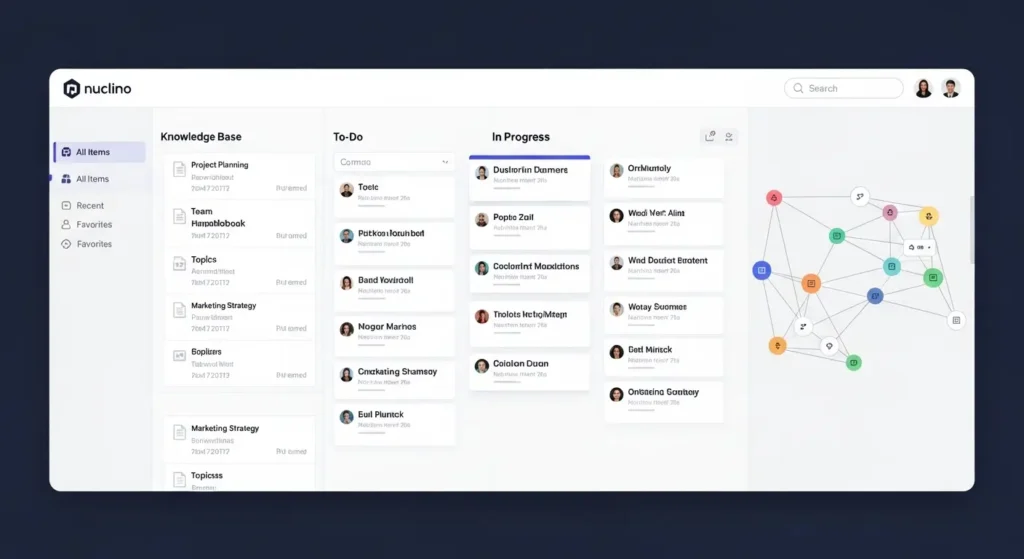
Welcome to the ultimate guide on Nuclino, the all-in-one team collaboration and knowledge management software designed to help teams stay organized, productive, and connected. In today’s fast-paced work environment, having a centralized workspace is essential for managing projects, documentation, and team knowledge efficiently. Nuclino brings all these capabilities into a single platform, making collaboration seamless and intuitive.
Whether you are a project manager, software developer, startup founder, or content creator, Nuclino offers tools to streamline your workflow. From real-time editing to AI-powered assistance and versatile visual boards, this guide explores every feature, benefit, pricing plan, and use case, helping you decide if Nuclino is the right tool for your team.
What is Nuclino? (Definition & Overview)
The Concept of a Collective Brain
At its core, Nuclino is designed as a “collective brain” for teams. It allows you to create, organize, and share knowledge in a single, collaborative workspace. Unlike traditional project management tools, Nuclino emphasizes simplicity, speed, and a minimal learning curve, making it ideal for teams of all sizes.
How Nuclino Works
Nuclino combines features of a wiki, project management tool, and collaborative workspace. Users can create pages for projects, documentation, tasks, or ideas, and link them together in a network of interconnected knowledge. Real-time editing ensures that team members stay updated, while intuitive navigation makes finding information fast and effortless.
Supported Platforms
Nuclino is available on multiple platforms, including:
- Web browser access for any device
- Desktop apps for Windows, macOS, and Linux
- Mobile apps for iOS and Android
This cross-platform support ensures that your team can stay connected and productive from anywhere.

Core Features of Nuclino
Knowledge Base & Wiki Creation
Nuclino allows teams to build structured knowledge bases or internal wikis. Pages can contain text, images, code snippets, and links, helping teams document processes, project notes, and company knowledge. The hierarchical organization and cross-linking make knowledge easy to access and navigate.
Real-Time Collaboration and Editing
Teams can work simultaneously on documents, with real-time updates visible to all collaborators. Version history ensures that previous edits are never lost, and commenting features allow for effective feedback and discussion.
Task & Project Management Views
Nuclino offers multiple views to organize work:
- List View: Simple task lists and notes
- Board View: Kanban-style boards for agile workflows
- Diagram/Graph View: Visual representation of pages and projects
These views help teams manage tasks efficiently, track progress, and visualize connections between projects and knowledge.
Visual Canvas & Graph View Integration
The visual canvas and graph view provide an overview of your team’s workspace. You can see how pages, tasks, and projects are interconnected, which enhances clarity and reduces duplicated work.
AI Assistant (Sidekick) Capabilities
Nuclino integrates AI assistance to help with content creation, summaries, task suggestions, and document optimization. The AI Sidekick can draft documents, summarize long pages, and provide productivity tips directly within your workspace.
Integrations with Other Tools
Nuclino supports integrations with popular apps such as Slack, Google Drive, Microsoft Teams, and Zapier. These integrations ensure that your team’s workflow remains smooth and connected across platforms.
Nuclino Pricing and Plans Explained
Free Plan Overview
The free plan is ideal for small teams or individual users. It includes unlimited collaborators, basic workspace features, and limited integrations, offering a solid starting point to test the platform.
Starter Plan Benefits
The Starter plan introduces enhanced features, including unlimited boards and pages, advanced integrations, and priority support. It is suitable for growing teams that need a more structured workspace.
Business Plan (AI and Security)
The Business plan includes AI-powered tools, advanced permissions, audit logs, and enterprise-grade security. This plan is designed for medium to large teams that require robust collaboration and knowledge management capabilities.
Pricing Comparison Table
| Plan | Price (per user/month) | Key Features |
| Free | $0 | Basic workspace, real-time editing |
| Starter | $5 | Unlimited boards/pages, integrations |
| Business | $12 | AI Sidekick, security, priority support |
Benefits and Key Advantages
Unified Workspace vs Tool Sprawl
Nuclino reduces the need for multiple apps by combining wiki, project management, and collaboration tools in one platform. Teams no longer need to juggle between multiple tools, saving time and reducing complexity.
Fast Search and Minimal Learning Curve
The search functionality is fast and intuitive. Users can locate pages, tasks, and linked documents in seconds. The interface is clean and easy to use, minimizing the onboarding time for new team members.
Productivity Boost and Team Knowledge Sharing
Nuclino encourages knowledge sharing and collaboration. Teams can document processes, track projects, and collaborate in real-time, significantly improving productivity and reducing duplicated work.
Best Use Cases
- Project management and task tracking
- Employee onboarding and documentation
- Knowledge base creation for software teams
- Content organization for marketing and creative teams
Common Use Cases
For Project Managers
Organize projects, assign tasks, and track progress using board views and timelines. Visual graph views help PMs monitor dependencies and workflow efficiency.
For Software Teams
Developers can document code snippets, APIs, and project notes collaboratively. Integration with GitHub and Slack enhances the development workflow.
For Small Businesses & Startups
Startups can manage projects, knowledge, and team collaboration without purchasing multiple expensive tools. Nuclino provides a cost-effective solution for growing teams.
For Knowledge Base Writers
Content creators and document writers can maintain internal wikis, update SOPs, and share resources easily across teams.
Nuclino vs Other Tools (Comparison)
Nuclino vs Notion
| Feature | Nuclino | Notion |
| Ease of Use | Easy, minimal learning | Moderate, flexible |
| Real-Time Collaboration | Yes | Yes |
| Views | List, Board, Graph | List, Board, Calendar |
| AI Assistance | Built-in Sidekick | External or Notion AI |
| Pricing | Affordable | Slightly higher |
Nuclino vs Confluence
Nuclino is simpler, faster, and more visual, while Confluence is feature-rich but more complex for small teams.
Nuclino vs Other Knowledge Tools
Compared to Guru or Slab, Nuclino provides better project management features along with wiki capabilities.
Pros and Cons
What Users Love
- Fast and intuitive interface
- All-in-one workspace
- AI Sidekick boosts productivity
- Multiple views for tasks and projects
Common Limitations
- Limited offline capabilities
- Advanced features require higher plans
- Some integrations need external tools
How to Get Started with Nuclino (Step-by-Step)
Creating Your First Workspace
- Sign up with your email or Google account
- Create a new workspace and invite team members
Setting Up Knowledge Base Pages
- Create pages for projects, tasks, or documentation
- Use tags and links to connect related pages
Using Views and Boards
- Switch between list, board, or graph view to organize information
- Drag and drop tasks or pages to update status
Integrating Sidekick AI
- Use the AI assistant to draft content, summarize notes, or suggest tasks
- AI Sidekick can speed up repetitive documentation work
Frequently Asked Questions (FAQ)
What makes Nuclino unique?
Nuclino combines a knowledge base, project management tool, and collaboration platform into a single, intuitive workspace, with AI assistance and multiple visual views.
Is Nuclino free?
Yes, Nuclino offers a free plan suitable for small teams or individual users, with limitations on advanced features and integrations.
Can it replace Notion?
For small teams or startups seeking simplicity and speed, Nuclino can replace Notion. However, Notion offers more advanced customization options for larger organizations.
How secure is Nuclino?
Nuclino provides enterprise-grade security, including role-based access, audit logs, and encrypted data storage, especially in its Business plan.
What teams benefit most from Nuclino?
Teams focused on project management, knowledge sharing, documentation, and collaborative content creation benefit the most from Nuclino.
Conclusion
Nuclino is a versatile and user-friendly knowledge management and team collaboration tool that simplifies workflow, boosts productivity, and organizes team knowledge in one unified workspace. Its combination of real-time collaboration, AI-powered assistance, multiple project views, and affordable pricing makes it an ideal choice for startups, software teams, and small to medium businesses.
If you are looking for a fast, visual, and intuitive platform to manage projects, documentation, and team collaboration, Nuclino is worth exploring. Start with the free plan to experience its capabilities and scale as your team grows.